Entra ID Attack & Defense: Exploiting App-Only Microsoft Graph Permissions

Welcome back!
ENTRA GOAT is a free vulnerable Entra ID lab developed by Semperis for the cyber community. According to them, it is designed to help cyber professionals better understand Entra ID concepts and attack paths. What we have been doing here is stepping through the various attack paths and then investigating them in our Splunk SIEM to find detection or hunt opportunities.
I hope you guys enjoyed Scenario 1. We are going to get started on Scenario 2 where we will pivot into app-only authentication, abuse over-privileged Graph permissions, and walk through how a single leaked certificate can lead to full Global Admin takeover.
If this is your first time visiting and are interested in following the series, I recommend you go to the first blog installment for this series.
Scenario 2: Exploiting App-Only Graph Permissions in Entra ID.

Let's start Entra Goat.


Click on Scenario 2 - Graph me the crown (and role)
The scenario reads, "The credentials dump you bought on BreachForums turned out to be gold - Jennifer Clark's password from a recent breach still works. She's a dev who pushes to prod from half-baked CI/CD scripts. While inspecting her DevOps logs, you found an exposed PFX in the logs! Use what you've got, escalate what you need, and work the Graph API chain to reach Global Admin privileges."

Essentially we want to copy the setup script, modify it a bit, and then run it.
I found that I had to add the below permission to my require scopes when authenticating as my GA account to run the setup scripts successfully without error.


It seems to have been created successfully.

Let's attack
Let's store the credentials in reusable variables.

To identify the owner of the certificate — which in this case would be the application it is attached to — we first decode the base64-encoded certificate and load it into an X509Certificate2 object. This allows us to inspect key metadata such as the subject, issuer, validity period, and thumbprint.

Above we can verify that the certificate is self-signed and was issued for Corporate Finance Analytics application.
Let's first login as Jennifer Clark to verify this. You may be prompted for MS Authenticator set up. If so, just do it.


We are in.

We saw that the cert was attached to an Application, so let's validate that and then store them in variables.

Pivoting into the Service Principal's context and building the attack path
With the certificate now decoded and the associated application identified, the next step is to pivot from our user context into the service principal itself. Using the certificate, we authenticate directly to Microsoft Graph through the OAuth client credentials flow, effectively operating as the application rather than a user.
In the screenshots below, we first terminate our existing user session, then authenticate to Graph using the service principal’s ClientId, tenant ID, and the recovered certificate. Do you notice TokenCredentialType is listed as ClientCertificate?
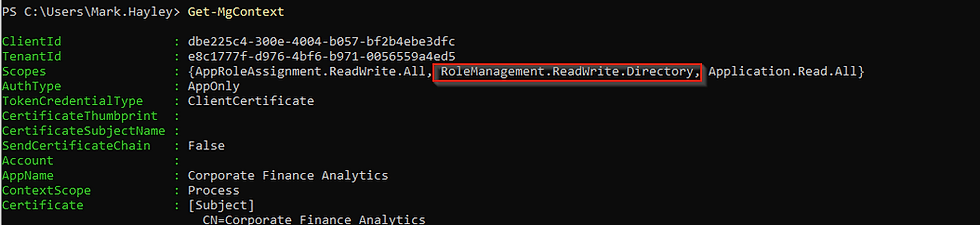
Finally, we inspect the current security context to confirm that our session is now operating under the service principal identity and to view the permissions granted to it.

Inspecting the session context with Get-MgContext reveals that the service principal holds two notable application permissions: Application.Read.All and the far more powerful AppRoleAssignment.ReadWrite.All. The latter is particularly dangerous because it allows the caller to assign application roles across service principals in the tenant including to itself. In other words, this permission gives the application the ability to grant additional Graph permissions programmatically, creating a clear path for privilege escalation.
While enumerating the available Microsoft Graph app roles, one permission in particular immediately stands out: RoleManagement.ReadWrite.Directory. Microsoft’s own documentation warns that this permission grants the ability to manage directory role assignments programmatically. In practical terms, this means any identity holding this permission can add or remove members from privileged Entra ID roles including Global Administrator. If we can assign this permission to our compromised service principal, we effectively gain the ability to elevate privileges anywhere in the tenant without requiring any user interaction.

Read more about this role here:
Now one may ask, why isn't the AppRoleAssignment.ReadWrite.All permission we had sufficient? To grant global admin, why do we need another role?
Although AppRoleAssignment.ReadWrite.All is already a powerful permission, it only allows the caller to assign application roles (Graph permissions) to service principals. It does not provide the ability to manage directory roles such as Global Administrator. Let's move the next step to see how can actually get that capability to manager directory roles.
Escalating Privileges through Permission assignment
In Entra ID, service principals can hold multiple types of privileges simultaneously including application permissions, directory roles, and even group memberships.
To escalate further, we use AppRoleAssignment.ReadWrite.All to grant our service principal the RoleManagement.ReadWrite.Directory permission, which specifically enables management of directory role assignments. With that permission in place, the service principal can then add itself to privileged roles like Global Administrator. To do this we use the following PowerShell code.

In the commands above, we first locate the Microsoft Graph service principal within the tenant by filtering for its well-known AppId (00000003-0000-0000-c000-000000000000). This service principal represents the local instance of the Microsoft Graph application and contains the full list of assignable Graph application roles. We then search through its available AppRoles to find the specific permission RoleManagement.ReadWrite.Directory.
Once identified, we construct an app role assignment that grants this permission to our compromised service principal by specifying three key values: the PrincipalId (the service principal receiving the permission), the ResourceId (the Microsoft Graph service principal providing the permission), and the AppRoleId (the unique identifier of the permission being granted).
Finally, the New-MgServicePrincipalAppRoleAssignment command applies the assignment, effectively granting our service principal the ability to manage directory role assignments across the tenant.
Let's disconnect and reconnect as app permissions are static claims in JWT, there's a need to issue a new token to see the changes.
Upon logging back in we see our token refreshed and directory role assignment
Before:

After:
Global admin me!
With the RoleManagement.ReadWrite.Directory permission now granted, our service principal has the ability to manage directory role assignments across the tenant. This includes adding identities to highly privileged roles such as Global Administrator.
In the following commands, we first locate the Global Administrator role using its well known role template ID. We then construct a reference to our compromised service principal and add it as a member of the Global Administrator role. Once this assignment is made, the service principal gains full administrative control over the Entra ID tenant.

Let's validate whether it indeed has been assigned the Global Admin role by using the Get-MgRolemanagementDirectoryRoleAssignment cmdlet.

We see the Global Admin Role Definition listed, so we're good.
Are you wondering why it was necessary to obtain a new JWT for the identity after the app permission but not after assigning a directory role? Semperis answered that question in their blog. To Summarize though:
The difference comes down to how authorization is evaluated. Application permissions are embedded in the access token when it is issued, so newly granted permissions require a new token to take effect. Directory roles, however, are often evaluated dynamically by Microsoft APIs at request time. This means newly assigned roles can become effective immediately without requiring the token to be refreshed.
Now that we've cleared that up we have one last step. As an attacker ideally we would want to be able to pivot to an admin account with significant access to resources and the control plane to complete action on objectives. Well with Global Admin role assigned to the service principal we can reset the password for the target admin account.
Pivoting to the session of the target admin user with more access.
Remember at the outset we were given a target admin account of the following:

With Global Administrator privileges now assigned to our service principal, we can perform privileged directory operations. In this step, we identify the target administrative account by constructing its user principal name using the tenant’s default verified domain. We then retrieve the corresponding user object from Entra ID so we can obtain its object ID, which is required to modify the account.
Next, we generate a new password and create a password profile object containing the updated credential. Using the Update-MgUser command, we reset the password of the target administrator account. This allows us to authenticate as the System Administrator and continue the attack from a fully privileged user context.

I tried using BARK Like Semperis to get the admin token, however, because of the MFA requirement and not having set it up as yet. It didn't work.

I decided to go the Azure portal route and as expected I had to setup MFA there.


After getting in, the Extension attributes 1 in Overview -> Properties is our flag.

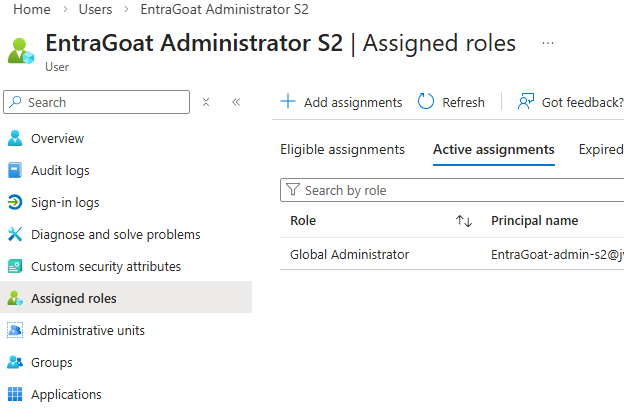
Here we see the account is also Global Admin.
We now submit our flag


Remember to clean up after.

We're going to now investigate what we just did in Splunk in the final section of this lab.
Here's our attack path recap before we dive in.
Attack path recap
Initial foothold: The attacker begins with access to a base64 encoded certificate and its password, which were exposed through CI/CD pipeline artifacts.
Identification: After decoding the certificate, the attacker determines that it belongs to a service principal in the tenant associated with the Corporate Finance Analytics application.
Permission discovery: Authenticating with the certificate allows the attacker to operate as the service principal. Inspecting its permissions reveals it has the powerful AppRoleAssignment.ReadWrite.All application permission.
Privilege escalation: Using this permission, the attacker assigns the RoleManagement.ReadWrite.Directory permission to the same service principal, enabling it to manage directory role assignments.
Role takeover: With directory role management capabilities in place, the attacker adds the service principal to the Global Administrator role.
Account compromise: Finally, the attacker demonstrates full control by resetting the password of a Global Administrator account and authenticating to retrieve the scenario flag.

Logs Don't Lie
With the attack chain complete, the next question becomes how defenders can identify and prevent this type of abuse. In the next section, we will look at the key signals and controls that can help detect and mitigate this attack path.
Taking a sneak peek at our Splunk logs from the past hour, I think we have a lot unpack!

Detecting the Certificate Based Authentication to the Service Principal
Although the attacker authenticates as a service principal rather than a user, the activity still leaves a clear trail in the Entra sign-in logs. In this case, the authentication occurs through the OAuth client credentials flow using a certificate. Entra does not explicitly label this as “certificate authentication,” but it does expose a key indicator: the clientCredentialType field.
When a service principal authenticates using a certificate, the clientCredentialType value appears as clientAssertion, indicating that the application presented a signed JWT generated with the certificate’s private key. I have another Service Principal called that authenticates with a secret, the clientCredentialType value in that case would be clientSecret.


Additionally, Entra records the certificate thumbprint used during authentication in the servicePrincipalCredentialThumbprint field. This provides defenders with a reliable way to identify which credential was used during the sign-in.
In the example below, we can see multiple successful sign-ins for the Corporate Finance Analytics service principal. The logs clearly show clientAssertion as the credential type along with the associated certificate thumbprint, confirming that the service principal authenticated using its registered certificate. You can read more on this here: https://learn.microsoft.com/en-us/entra/identity-platform/v2-oauth2-client-creds-grant-flow#get-a-token
From a defensive standpoint, this is a valuable signal. Many organizations focus heavily on monitoring user sign-ins but overlook service principal authentication activity. Monitoring for certificate-based service principal sign-ins, especially those originating from unusual IP addresses or locations, can provide early visibility into attacks that rely on compromised application credentials.

See the SPL below:
index = entra_eventhub  category=ServicePrincipalSignInLogs properties.appDisplayName ="Corporate Finance Analytics"
| rename
  properties.appDisplayName as Actor_APP,
  properties.servicePrincipalId as Actor_APP_ID
  properties.userAgent as UserAgent
  properties.clientCredentialType as CredentialType,
  properties.servicePrincipalCredentialThumbprint as CredentialThumbprint
  properties.incomingTokenType as TokenType,
  properties.location.countryOrRegion as Location
  properties.resourceDisplayName as TargetObject
| table _time correlationId category Actor_APP Actor_APP_ID callerIpAddress CredentialType CredentialThumbprint TokenType operationName Location TargetObject UserAgent resultSignature
Detecting Service Principal Privilege Escalation: App and Directory Role Assignment
The privilege escalation phase of this attack also leaves a clear trail in the Entra audit logs. Two high-impact operations occur in quick succession: the assignment of a powerful Microsoft Graph application permission and the elevation of the service principal to the Global Administrator role.
The first event shows the service principal assigning the RoleManagement.ReadWrite.Directory permission to itself. This permission grants programmatic control over Entra directory role assignments and is rarely required for normal application workloads.
Shortly after, the logs capture a second critical event: Add member to role, where the same service principal adds itself to the Global Administrator role. This marks the completion of the privilege escalation chain, granting the application identity full administrative control of the tenant.

When viewed together, these two events provide a strong detection opportunity. Any service principal assigning high-risk Graph permissions and then modifying directory role membership should immediately raise suspicion.
See the SPL search below for role modifications by suspecting Service Principal:
index=entra_eventhub category = AuditLogs operationName IN ("Add app role assignment to service principal","Add member to role") identity = "Corporate Finance Analytics"
| eval UserAgent = mvindex('properties.additionalDetails{}.value',0)
| rename operationName as Operation,
  properties.initiatedBy.user.userPrincipalName as Actor_UPN,
  properties.initiatedBy.app.displayName as Actor_APP,
  properties.initiatedBy.app.servicePrincipalId as Actor_APP_ID
  properties.initiatedBy.user.ipAddress as CallerIpAddress,
  properties.targetResources{}.displayName as TargetObject,
  properties.targetResources{}.type as TargetType,
  properties.targetResources{}.id as TargetID,
  properties.targetResources{}.userPrincipalName as TargetUPN,
  properties.targetResources{}.modifiedProperties{}.displayName as TargetProperties.DisplayName,
  properties.targetResources{}.modifiedProperties{}.newValue as TargetProperties.NewValues,
  properties.targetResources{}.modifiedProperties{}.oldValue as TargetProperties.OldValues,
| table _time correlationId Actor_UPN Actor_APP Actor_APP_ID Operation  CallerIpAddress UserAgent TargetObject TargetType TargetID TargetUPN TargetProperties.DisplayName TargetProperties.NewValues TargetProperties.OldValues resultDescription
Detecting Admin account take over
The final step of the attack is the takeover of a privileged account. In the audit logs, the most meaningful signal appears as the Reset user password operation. This event shows the Corporate Finance Analytics service principal resetting the password of the EntraGoat-admin-s2 Global Administrator account.
At the same time, Entra records Update StsRefreshTokenValidFrom, indicating that existing refresh tokens for the account were invalidated as part of the password reset process. When viewed together, these events clearly document the takeover of a privileged account initiated by a service principal that had previously escalated its permissions within the tenant.

index=entra_eventhub category = AuditLogs operationName IN ("Reset user password","Update StsRefreshTokenValidFrom Timestamp")
identity = "Corporate Finance Analytics"
| eval UserAgent = mvindex('properties.additionalDetails{}.value',0)
| rename operationName as Operation,
  properties.initiatedBy.user.userPrincipalName as Actor_UPN,
  properties.initiatedBy.app.displayName as Actor_APP,
  properties.initiatedBy.app.servicePrincipalId as Actor_APP_ID
  properties.initiatedBy.user.ipAddress as CallerIpAddress,
  properties.targetResources{}.displayName as TargetObject,
  properties.targetResources{}.type as TargetType,
  properties.targetResources{}.id as TargetID,
  properties.targetResources{}.userPrincipalName as TargetUPN,
| table _time correlationId Actor_UPN Actor_APP Actor_APP_ID Operation  CallerIpAddress UserAgent TargetObject TargetType TargetID TargetUPN
At this point, the attacker transitions from controlling an application identity to controlling a privileged user identity within the tenant. This can be verified through the interactive sign-in logs. By pivoting on the previously identified attacker IP address, we can pinpoint when the attacker successfully logged into the compromised Global Administrator account. This timestamp becomes a key investigative pivot for identifying any subsequent control plane activity performed with the privileged account.


See the Sign-in Logs SPL Search below:
index=entra_eventhub category=SignInLogs properties.userPrincipalName="entragoat-admin-s2@*.onmicrosoft.com"
| rename
    properties.userPrincipalName as Actor_UPN,
    properties.appDisplayName as Actor_APP,
    properties.clientAppUsed as ClientApp,
    properties.userAgent as UserAgent,
    properties.location.countryOrRegion as Location
| table _time callerIpAddress Actor_UPN Actor_APP ClientApp identity Location UserAgent resultSignature
This covers the main investigation searches that would be needed in the attack chain covered. But what kind of pivots should be done after all of this?
Post-Compromise Pivots
Common follow-on control plane activity to investigate includes:
• creating new privileged users or service principals
• assigning additional directory roles or modifying existing role memberships
• adding new credentials (certificates or secrets) to service principals
• granting additional Microsoft Graph permissions to applications
• modifying Conditional Access or authentication policies
• registering new applications within the tenant
These actions typically appear in Entra audit logs and can indicate attempts by the attacker to maintain long-term access or create additional backdoors. Once persistence mechanisms are established, attackers may pivot into data plane activity to access sensitive organizational data.
Reviewing activity across additional resources such as the following may be helpful.
• Azure subscriptions – creating new service principals, assigning RBAC roles, or modifying resource access
• Azure Key Vault – retrieving secrets, certificates, or keys used by applications
• Azure Storage – enumerating or downloading blob data and backups
• Exchange Online – accessing mailboxes or creating inbox forwarding rules
• SharePoint / OneDrive – downloading sensitive files or enumerating document libraries
• Microsoft Graph applications – granting additional API permissions or registering new applications
• Defender / security tooling – disabling alerts or modifying security policies
These activities are typically recorded in service-specific logs such as Azure Activity Logs, Exchange audit logs, or Microsoft 365 Unified Audit Logs.
Conclusion
Ultimately, this scenario demonstrates how an attack that begins with a leaked application credential can quickly escalate into full tenant compromise. By abusing overly permissive application roles and service principal authentication, the attacker was able to move from certificate-based authentication to Global Administrator access without ever compromising a traditional user account. While the attack chain may seem complex, the underlying actions leave a clear trail across Entra sign-in and audit logs. With proper visibility into service principal activity and permission changes, defenders can detect and investigate these attacks before they escalate into broader control plane or data plane compromise.


Comments